 Gacha Nebula
 vs Gacha Club: Differences (2026)
If you have spent any time in the Gacha community, you have heard both names thrown around. Gacha Club is the official game by Lunime that started it all. Gacha Nebula is the fan-made mod that promises more of everything. And the question everyone asks is simple: in the gacha nebula vs gacha club debate, which one deserves space on your phone?
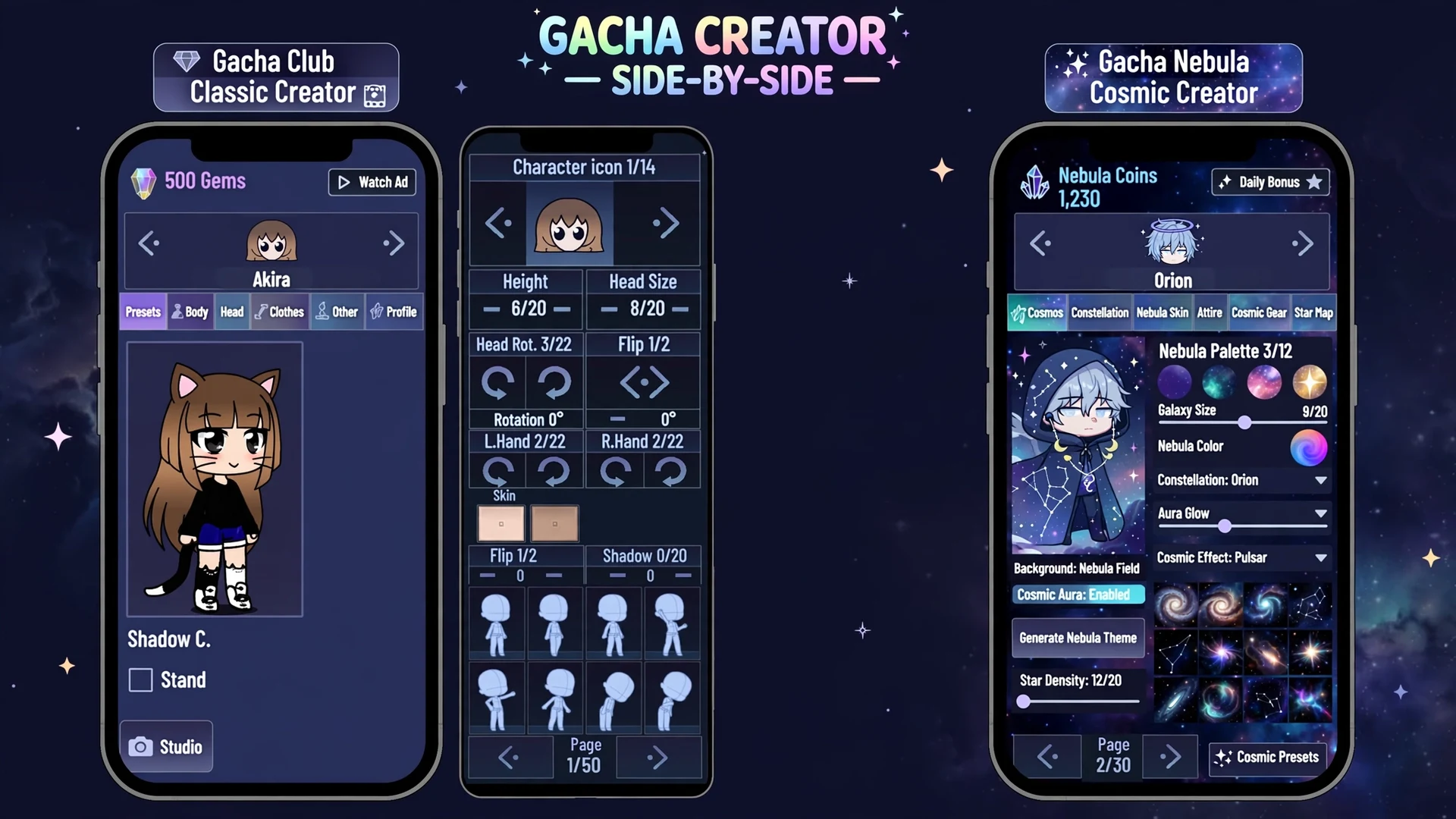
Here is the thing: they are not really rivals. Nebula is built directly on Club's foundation, so choosing between them is less about picking a winner and more about matching the app to how you play. When you install Gacha Nebula, you are getting Club's engine with a community-made expansion pack bolted on top. If you are brand new to the mod itself, start with our guide on what Gacha Nebula is before you dive into this comparison.
This guide compares gacha nebula vs gacha club feature by feature, based on what each app actually does in 2026. No hype, no copied feature lists, no myths about features that do not exist. Just the real differences, the honest trade-offs, and a clear answer on who should pick which.
Quick answer: Gacha Nebula vs Gacha Club comes down to official vs modded. Gacha Club is Lunime's official, stable game for Android, iOS, and PC. Gacha Nebula is a free fan mod of Club with 1,500+ extra assets, pupil masking, expanded colors, and a galaxy-themed UI, but only for Android and Windows, with no official support. Creators who want more design freedom pick Nebula; players who want stability and iOS pick Club.
Gacha Nebula vs Gacha Club: The Short Answer
Short on time? Here is the whole gacha nebula vs gacha club comparison in one table. Nebula wins on creative freedom, Club wins on stability and platform reach, and both are completely free.
| Feature | Gacha Club (official) | Gacha Nebula (fan mod) |
|---|---|---|
| Made by | Lunime (official developer) | Noxula (fan modder) |
| Price | Free, no in-app purchases | Free, no in-app purchases |
| Item library | Fixed official asset set | 1,500+ additional assets |
| Eye customization | Standard, some clipping issues | Pupil masking for cleaner results |
| Color options | Standard palette | Expanded, less restrictive palette |
| Character slots | Standard slots | Extra slots for more OCs |
| UI theme | Classic Gacha look | Space and galaxy theme, new mascot |
| Platforms | Android, iOS, Windows PC | Android and Windows PC only |
| File size | Smaller download | Larger, because of added assets |
| Stability | Very stable, long track record | Mostly stable, occasional bugs after updates |
| Updates | Official, slower cadence | Community-driven, faster item drops |
| Support | Official developer support | Community and devlog support only |
That table answers the what. The rest of this guide answers the so what: which differences actually matter when you are designing characters at midnight, and which ones are just marketing noise.
What the table does not show
Tables flatten the experience. They cannot show you how it feels when a sleeve finally layers without clipping, or how much faster designing gets when the color picker stops fighting you. Those small daily frictions are where Nebula earns its reputation, and they are also why so many players end up keeping both apps instead of choosing.
What Gacha Club Actually Is
Gacha Club is the official game by Lunime, and it is the foundation everything else in this comparison is built on. It combines character creation with a story mode, a studio mode for building scenes, turn-based battles, and mini-games. You design original characters, place them in scenes with dialogue and props, recruit club members, and battle through story chapters.
What most people miss is how complete the base game already is. The customization covers hair, eyes, clothes, accessories, pets, and poses. The studio lets you arrange up to ten characters with backgrounds and text bubbles. And it runs on Android, iPhone, and Windows, which makes it the easy recommendation for anyone who just wants the official, no-fuss experience. Lunime's newer Gacha Life 2 continues the same family line for players who want the latest official release.
Why players stay loyal to the official game
Stability is the big one. Gacha Club has years of polish behind it, official updates that do not break saves out of nowhere, and support channels that actually exist. Parents prefer it too, because it comes from real app stores instead of a downloaded APK file. And if you play on iPhone or iPad, the decision is already made for you, since the mod never officially released for iOS.
What Gacha Nebula Actually Is
Gacha Nebula is a fan-made mod of Gacha Club, created by a modder known as Noxula. It is not made by Lunime, not endorsed by Lunime, and not available on official app stores. You download it as an APK for Android or a ZIP for Windows from the developer's itch.io page, which is why guides about where to download Gacha Nebula and how to install the APK safely exist in the first place.
The mod keeps Club's entire engine, every mode, every system, and layers a huge expansion on top: more than 1,500 new clothing items, accessories, hairstyles, and props, plus new backgrounds, poses, and effects. The whole interface gets a space and galaxy reskin with a new mascot and new music. Think of it as the same game wearing a much fancier wardrobe.
How to know you have the real mod
Because Nebula spreads through APK files instead of app stores, fake copies exist. The real builds come in 32-bit and 64-bit versions, and our 32-bit vs 64-bit chooser explains which one your phone needs. If a download ever fails outright, the App Not Installed fixes cover the usual causes. And since version numbers get faked too, the 1.7.0.2 verification guide shows how to confirm what you are actually running. The community also tracks the mod's release status between updates.
Feature by Feature: Where Nebula Pulls Ahead
This is the section that actually decides the gacha nebula vs gacha club question for most readers. If you spend your time designing original characters rather than battling through story mode, these are the differences you will feel every single session.
The asset library: 1,500+ new items
The headline number is real: Nebula adds over fifteen hundred new assets on top of everything Club already includes. We are talking hairstyles with built-in highlights, layered sleeves, techwear pieces, fantasy armor, themed sets for seasons like winter and Halloween, and tiny detail items that would normally require a separate drawing app to fake. For GachaTubers who need characters to look consistent from every camera angle, that depth is the whole selling point. Our content creator guide shows how creators put the bigger library to work.
Pupil masking and cleaner eyes
Here is a small feature with an outsized impact. In stock Gacha Club, complex eye designs sometimes clip or layer awkwardly. Nebula's pupil masking cleans that up, so detailed eyes, highlights, and expressions render the way you designed them. It is the kind of refinement you only notice once you have seen the before and after, and then you cannot unsee it.
Colors, adjust tools, and extra slots
Nebula loosens the color restrictions, so gradients and unusual palettes that Club would fight you on just work. The adjust tooling goes deeper for fine-tuning character proportions, and you get additional character slots for storing more OCs without deleting old favorites. None of these are flashy on a feature list, but together they remove the little frictions that slow down serious designers.
What Stays Exactly the Same
Do not let the new wardrobe fool you: under the galaxy theme, Nebula runs Club's engine. Studio Mode works the same way, battles play the same way, and the mini-games are the same mini-games. If you can build a scene in Club, you already know how to build one in Nebula.
The character code system carries over untouched too. Export codes from Club import cleanly into Nebula, which is exactly how most players migrate their OCs. Our guide to Gacha Nebula codes covers the export and import process step by step.
Updates and old builds behave the same way
Both apps need the same care around updates: back up before you touch anything. The update without losing data walkthrough and the general update guide apply to Nebula specifically. And if you ever need to roll back, the old version guide explains your options.
The Honest Trade-Offs of the Mod
A fair gacha nebula vs gacha club comparison has to say what Nebula costs you, because every mod has a price even when the download is free. Here are the real ones, without sugarcoating.
No iOS, no official support
The two biggest trade-offs are platforms and support. Nebula has no official iOS release, so iPhone and iPad players cannot join in. Check our iOS guide and iPad guide for the full picture, but the short version is that Apple users stay with Club. And when something breaks in a mod, there is no official help desk, only community channels and the developer's devlogs.
Occasional bugs and a bigger download
As a community mod, Nebula can ship small bugs after updates that the official game would have caught in testing. Most are cosmetic and get patched quickly, but it is the nature of modded software. The download is also noticeably larger because of all the added assets, and asset-heavy scenes can feel sluggish on older phones. None of this makes the mod unsafe, but read our safety guide so you understand exactly what you are installing and how to verify clean files.
Myths competitors keep repeating
Let me clear up the fiction, because ranking pages keep inventing features. Gacha Nebula has no in-app purchases and no multiplayer, PvP, or chat systems. It has no exploration maps or story modes beyond what Club already includes. And despite what some download pages claim, there is no official iOS version on the App Store. If a site lists these as Nebula features, it is describing a different game, or no game at all.
Can You Move Your Characters from Club to Nebula?
Quick answer: Yes, and it is easy. Export any character in Gacha Club to get its code, then import that code in Gacha Nebula. The process takes under a minute per OC, and it is the same code system both apps share.
Here is how it works in practice. In Gacha Club, open the character, go to Profile, then Export, and copy the code. In Nebula, pick a slot you are willing to overwrite, go to Profile, then Import, and paste it. Your OC rebuilds itself with its design, colors, name, and bio intact.
What transfers and what does not
Everything from Club's own asset set transfers perfectly, because Nebula contains all of it. The one direction that breaks is Nebula to Club: if your OC wears Nebula-exclusive items, importing it back into stock Club will lose those pieces or render them wrong. So migrate in one direction, from Club to Nebula, and treat Nebula as the new home for your upgraded designs. And always export your codes to a notes app before any update, since updates are the number one way players lose characters.
Can You Keep Both Apps Installed?
Yes, and plenty of players do exactly that. Nebula installs as a separate app alongside Gacha Club, with its own data and its own character slots. They do not overwrite each other, and you can bounce between them freely.
This is actually the smartest setup for a lot of people. Keep Club as your stable, official base, especially for battles and story progress you do not want to risk. Use Nebula as your creative studio where the bigger asset library and cleaner eye rendering live. Your OCs can travel between them with export codes whenever you want a Club character to get the Nebula treatment.
Desktop players have the same choice
On computers the picture is equally flexible. Club runs on Windows officially, while Nebula offers a native Windows build that skips emulators entirely. Our Gacha Nebula for Windows page and the native PC guide walk through the setup. Mac players should check the Mac and Linux guide, and Chromebook owners have their own Chromebook guide, since the mod's platform story differs from Club's on each system.
Who Should Pick Which: The Verdict
After all the feature talk, here is the gacha nebula vs gacha club decision in plain language. There is no universal winner, but there is almost always a right answer for you.
| Pick Gacha Club if you... | Pick Gacha Nebula if you... |
|---|---|
| Play on iPhone or iPad | Design OCs for hours at a time |
| Want official support and maximum stability | Make GachaTube or TikTok content |
| Prefer smaller downloads | Want 1,500+ extra items and poses |
| Mainly play battles and story mode | Care about detailed eyes and color freedom |
| Want the safest option for younger players | Play on Android or Windows PC |
The one-week test for the undecided
But what if you are still torn? Start with both installed, since that costs nothing. Spend a week designing in Nebula and battling in Club, then notice which icon you keep tapping. Most creators never go back once the bigger wardrobe clicks. And most casual players are perfectly happy never leaving the official game.
Frequently Asked Questions
Is Gacha Nebula better than Gacha Club?
It depends on what you value. Gacha Nebula is better for character design, with 1,500+ extra assets, pupil masking, expanded colors, and more slots. Gacha Club is better for stability, official support, and platform reach, since it runs on iOS while Nebula does not. Many players install both and use each for its strengths.
Is Gacha Nebula an official Lunime game?
No. Gacha Nebula is a fan-made mod created by Noxula, not by Lunime, and it is not endorsed by the official developer. It is distributed as an APK for Android and a ZIP for Windows through the developer's itch.io page, not through Google Play or the App Store. Always verify your download source before installing any modded APK.
Can I transfer my characters from Gacha Club to Gacha Nebula?
Yes. Export any character in Gacha Club from Profile, Export to get its code, then import that code in Gacha Nebula from Profile, Import. The design, colors, name, and bio transfer intact. Note that the reverse does not work cleanly: OCs wearing Nebula-exclusive items will lose those pieces if imported back into stock Gacha Club.
Can I have both Gacha Club and Gacha Nebula on one phone?
Yes. Gacha Nebula installs as a completely separate app with its own data and character slots, so it never overwrites Gacha Club. Many players keep Club for battles and story progress and use Nebula as their creative studio. Just remember which app you are opening, since the icons can look similar at a glance.
Does Gacha Nebula work on iPhone like Gacha Club does?
No. Gacha Club is officially available on iOS, but Gacha Nebula has no official iPhone or iPad release. Any site claiming an App Store version of the mod is misleading you. Apple users who want the Nebula asset library currently have no official path, so iPhone and iPad players should stay with Gacha Club.
Are there in-app purchases in Gacha Nebula?
No. Neither Gacha Nebula nor Gacha Club has in-app purchases; both are completely free. Pages advertising unlimited money editions or premium unlocks for Nebula are scams or describe unrelated fake apps. The mod's full asset library is available without paying anything, which is one of its main attractions.
Will my characters look identical after moving to Nebula?
Characters built only from Gacha Club's original assets look identical after transfer, since Nebula includes the full official asset set. Differences appear only if you then dress the OC in Nebula-exclusive items, which stock Club cannot render. For a pixel-perfect move, export from Club and import into Nebula without changing anything in between.
Should I delete Gacha Club after installing Nebula?
There is no need to. Keeping both gives you the best of each: Club's stability and official support plus Nebula's expanded creative toolkit. Your phone storage is the only real cost, since Nebula's larger asset library makes it the heavier download. Delete Club only if you are certain you will never need its battle progress or iOS sync again.
Final Verdict on Gacha Nebula vs Gacha Club
The gacha nebula vs gacha club question was never really a fight. Club is the official foundation: stable, supported, and available everywhere including iOS. Nebula is what happens when a talented fan takes that foundation and builds the ultimate creator's toolkit on top of it, with thousands of new assets, cleaner eyes, freer colors, and a gorgeous galaxy skin.
Your move is simple. If you design characters, make videos, or live in Studio Mode, install Nebula alongside Club and migrate your favorite OCs with export codes. If you value stability, play on Apple devices, or just want the official experience, Club remains excellent and always will be. Either way, you are playing the same beloved engine, just dressed for different occasions. Settle the gacha nebula vs gacha club question the honest way, by matching the app to how you actually play, and start creating.